

Startups must prioritize authentication to protect sensitive investor data. This guide summarizes Single Sign-On (SSO) and Security Assertion Markup Language (SAML), how they pair to simplify access, how to configure SAML, security best practices, and basic troubleshooting to preserve compliance.
SSO allows a single authentication to grant access across multiple services. SAML transports signed authentication assertions between an identity provider (IdP) and a service provider (SP), enabling secure, repeated-free logins and reducing credential exposure—important for investor data rooms.
When a user requests access, they're redirected to the IdP to authenticate. The IdP returns a SAML assertion to the SP to confirm identity and attributes. The SP grants access based on that assertion, which improves security and usability.
Investor data rooms contain confidential documents. SSO with SAML provides central authentication, signed assertions, and encrypted transport, helping meet compliance and reducing risky password practices.
Clear SSO and SAML policies are vital for startups to sustain strong security and compliance, as research on single sign-on in growing startups indicates.
SSO and SAML Policy for Startups
Discusses authentication, single sign-on, and SAML. It uses Castor QISMS policy as an example of effective policy aligned with ISO requirements. Source: Single sign-on in a growing start-up, 2021.
A structured SAML rollout reduces errors. Map responsibilities, gather IdP/SP metadata, and validate configuration before wide release.
A comprehensive roadmap can be invaluable for startups implementing SAML.
SAML SSO Implementation Roadmap for Startups
This thesis provides a roadmap for implementing a SAML 2.0 web browser SSO profile and focuses on the SAML SSO protocol. Source: A roadmap for ensuring SAML authentication using Identity Server for on-premises and cloud, 2019.
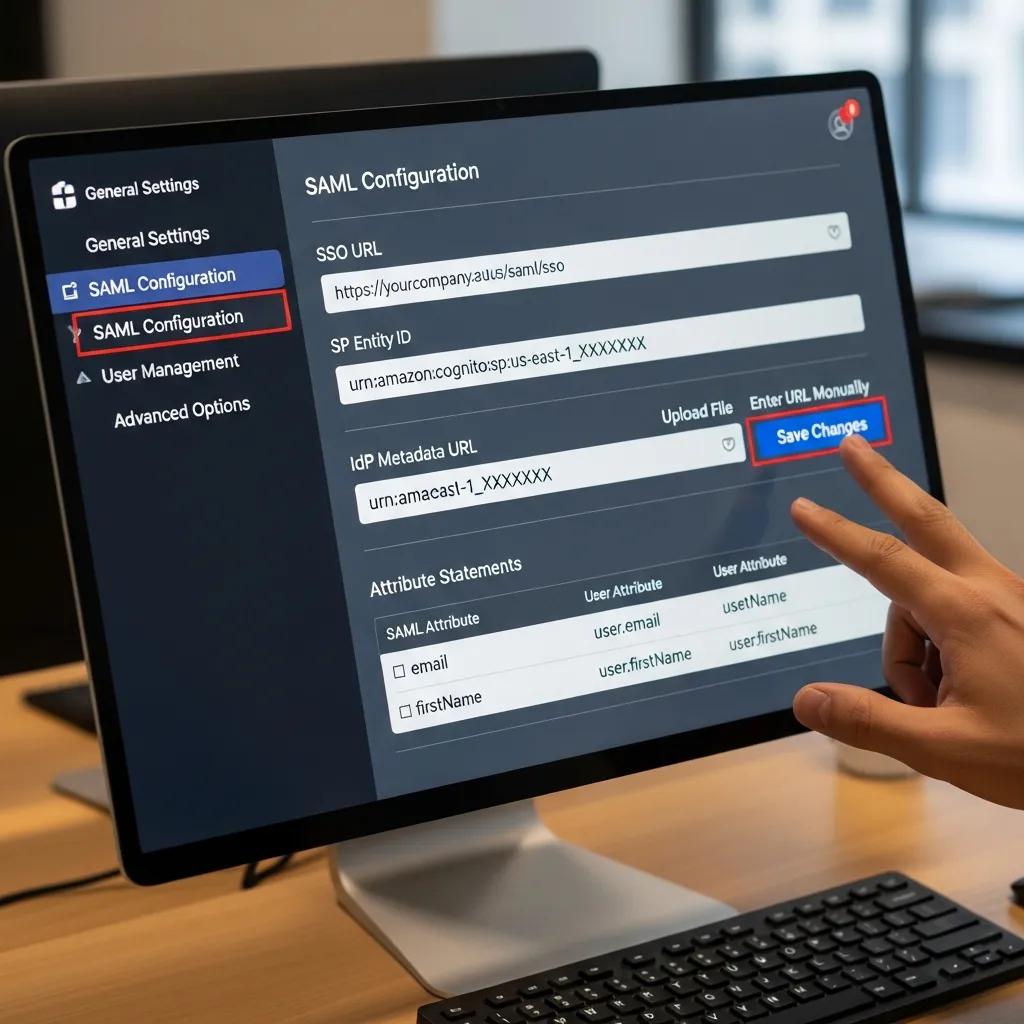
These steps help founders implement SAML and strengthen investor data room access controls.
Common compatible providers include Okta, OneLogin, and Microsoft Azure AD; each offers mature SAML support and enterprise features.
Recent research highlights Okta’s effectiveness in integrating enterprise SSO and SAML with open-source tools.
Enterprise SSO & SAML Integration for Open-Source Tools
The Auth Shim pattern enables enterprise-grade SSO and automated RBAC for standalone OSS tools. A case study integrating a BI tool with Okta SAML demonstrates its effectiveness in streamlining access and enhancing security. Source: The Auth Shim: A Lightweight Architectural Pattern for Integrating Enterprise SSO with Standalone Open-Source Applications, Y Agrawal, 2025.
These providers support advanced authentication methods to protect investor data rooms.
Adopt layered controls: strong encryption, access logging, least privilege, and periodic audits to limit exposure and meet regulatory expectations.
Encrypt data in transit and at rest, use modern TLS and key management, and keep audit trails. Regular compliance reviews (e.g., GDPR/HIPAA where applicable) ensure controls remain effective.

Implement zero trust principles: continuous verification, short-lived sessions, and contextual access. Enforce multi-factor authentication (MFA) to block credential-based breaches and limit lateral movement.
Most issues arise from configuration mismatches. Use systematic checks and logs to identify failures quickly.
Typical problems are incorrect endpoints, mismatched entity IDs, and expired or wrong certificates. Verify both IdP and SP metadata, review SAML traces or logs, and confirm clock skew and certificate validity.
Systematic verification and logging speed resolution and reduce downtime.
Prioritize UX and reliability: schedule regular tests, solicit user feedback, and publish clear login instructions and support channels.
These practices reduce support load and improve investor access.
SSO reduces password fatigue, centralizes access control, and simplifies onboarding/offboarding while supporting consistent security policies.
Audit authentication flows, encrypt data, retain access logs, and train staff. Update controls as regulations change and document processes for audits.
MFA adds an additional verification step (OTP, push, biometrics), significantly lowering the risk from stolen credentials.
Challenges include configuration errors, attribute mapping, and user adoption. Thorough testing and clear documentation reduce deployment friction.
Communicate benefits, provide training and quick-reference guides, and collect feedback during the rollout to fix pain points fast.
Check settings on both IdP and SP, review logs for assertions or certificate failures, consult vendor documentation, and contact support if needed.
SSO and SAML give startups a scalable way to secure logins and protect investor data. Use trusted IdPs, enforce MFA, follow a staged rollout, and maintain testing and monitoring to keep access secure and reliable.
Don't let a disorganized data room kill your deal momentum. Run a 50-point diagnostic on your pitch deck using Clara. Get objective, data-backed feedback on your Deal Readiness.
Get Your Readiness Score